
82 lines
5 KiB
Text
82 lines
5 KiB
Text
MatterControl includes all the things you need to create your ideas - out of the box!
|
|
|
|

|
|
|
|
Whis these simple primitives and the included tools you can create anything you can imagine.
|
|
|
|
- Cube
|
|

|
|
- **Width:** Set the size in X
|
|
- **Dethp:** Set the size in Y
|
|
- **Height:** Set the size in Z
|
|
- Pyramid
|
|

|
|
- **Width:** Set the size in X
|
|
- **Dethp:** Set the size in Y
|
|
- **Height:** Set the size in Z
|
|
- Half Wedge
|
|

|
|
- **Width:** Set the size in X
|
|
- **Dethp:** Set the size in Y
|
|
- **Height:** Set the size in Z
|
|
- Text
|
|

|
|
- **Name:** Type whatever text you want to show
|
|
- **Point Size:** Set the size of the font. This is acurate when printed to the same size as a 2D printer.
|
|
- **Height:** Set the height you want to have the text reach up to
|
|
- **Font:** Select the font you would like to use
|
|
- Cylinder
|
|

|
|
- **Diameter:** Set the size accross the part
|
|
- **Height:** Set the size in Z
|
|
- **Sides:** Set the number of faces (or sides) around the part
|
|
- **Advanced:** Opens up advanced settings to control more features
|
|
- **Starting Angle:** The angle to start revolving the cylinder
|
|
- **Ending Angle:** The angle to end revolving the cylinder
|
|
- **Diameter Top:** The size of the top of the cylinder
|
|
- Cone
|
|

|
|
- **Diameter:** Set the size accross the part
|
|
- **Height:** Set the size in Z
|
|
- **Sides:** Set the number of faces (or sides) around the part
|
|
- Half Cylinder
|
|

|
|
- **Diameter:** Set the size accross the part
|
|
- **Height:** Set the size in Z
|
|
- **Sides:** Set the number of faces (or sides) around the part
|
|
- Torus
|
|

|
|
- **Outer Diameter:** Set the size accross the part
|
|
- **Inner Diameter:** Set the size of the inside of the torus
|
|
- **Sides:** Set the number of faces (or sides) around the part
|
|
- **Advanced:** Opens up advanced settings to control more features
|
|
- **Starting Angle:** The angle to start revolving the cylinder
|
|
- **Ending Angle:** The angle to end revolving the cylinder
|
|
- **Ring Sides:** The number of sides going around the ring
|
|
- **Ring Phase Angle:** The angle to start the ring sides
|
|
- Ring
|
|

|
|
- **Outer Diameter:** Set the size accross the part
|
|
- **Inner Diameter:** Set the size of the inside of the torus
|
|
- **Height:** Set the size in Z
|
|
- **Sides:** Set the number of faces (or sides) around the part
|
|
- **Advanced:** Opens up advanced settings to control more features
|
|
- **Starting Angle:** The angle to start revolving the cylinder
|
|
- **Ending Angle:** The angle to end revolving the cylinder
|
|
- Sphere
|
|

|
|
- **Diameter:** Set the size accross the part
|
|
- **Sides:** Set the number of faces (or sides) around the part
|
|
- **Advanced:** Opens up advanced settings to control more features
|
|
- **Starting Angle:** The angle to start revolving the cylinder
|
|
- **Ending Angle:** The angle to end revolving the cylinder
|
|
- **Latitude Sides:** The number of sides going top to bottom
|
|
- Half Sphere
|
|

|
|
- **Diameter:** Set the size accross the part
|
|
- **Longitude Sides:** Set the number of faces (or sides) around the part
|
|
- **Latitude Sides:** The number of sides going top to bottom
|
|
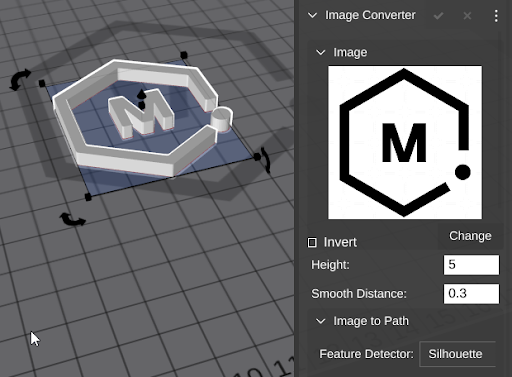
- [Image Converter](designing/design-primitives/image-converter.md)
|
|
|
|
- Image Converter can help you build complet extrusions from images
|
|
- You can also drag images directly to the bed and use the tools you find in the overflow menu to create all the fetures (and more) of Image Converter.
|